If you’re searching “web design hair salon” because you’re planning a new site or redesign, one question beats colours, fonts and taglines: will it bring bookings? Most salon sites are digital brochures: pretty, slow, silent. This guide to hair salon web design gives UK owners the pages, layouts and booking flow that get bookings, with wireframes and a checklist.
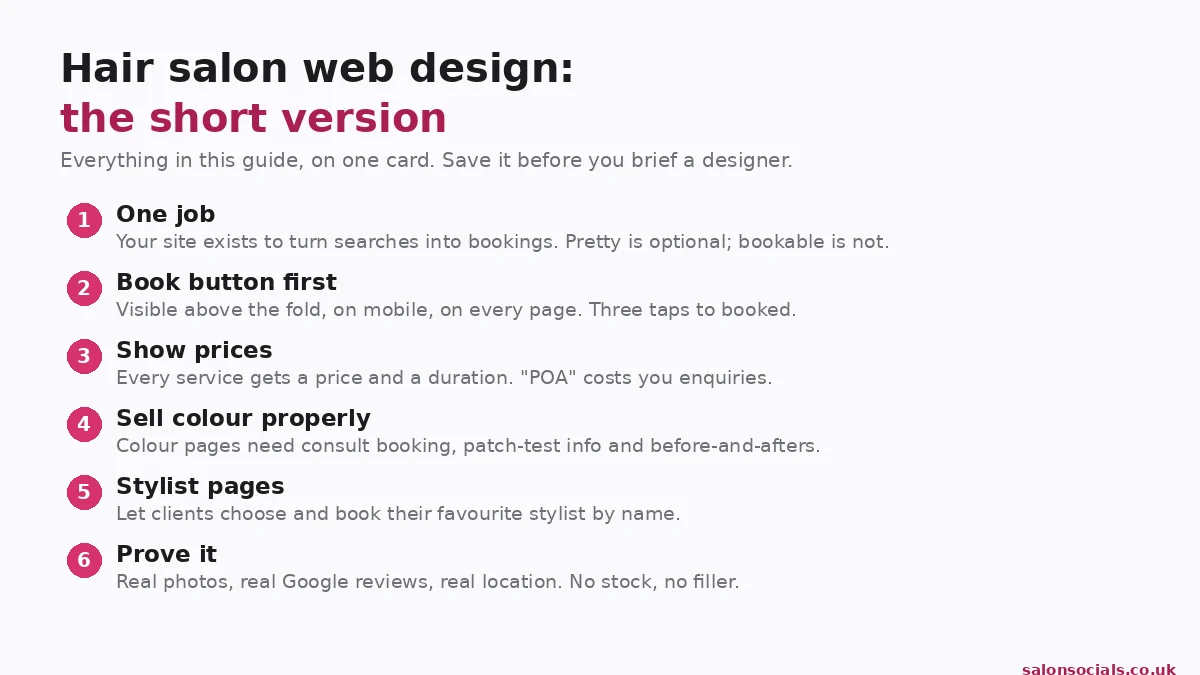
TL;DR, the short version
- One job: turn Google searches into booked appointments.
- Above the fold: what you do, where, prices, proof, a Book button, mobile first.
- Colour pages need prices, durations, consult booking and patch-test info.
- Stylist pages with book-with-me links win repeat bookings.
- Three taps from landing to booked, or you’re losing clients.
- Run the 20-point checklist before you pay anyone a penny.
Not sure your site is pulling its weight? Book a free 30-minute website review, we’ll tell you exactly what’s costing you bookings.
What a hair salon website actually has to do
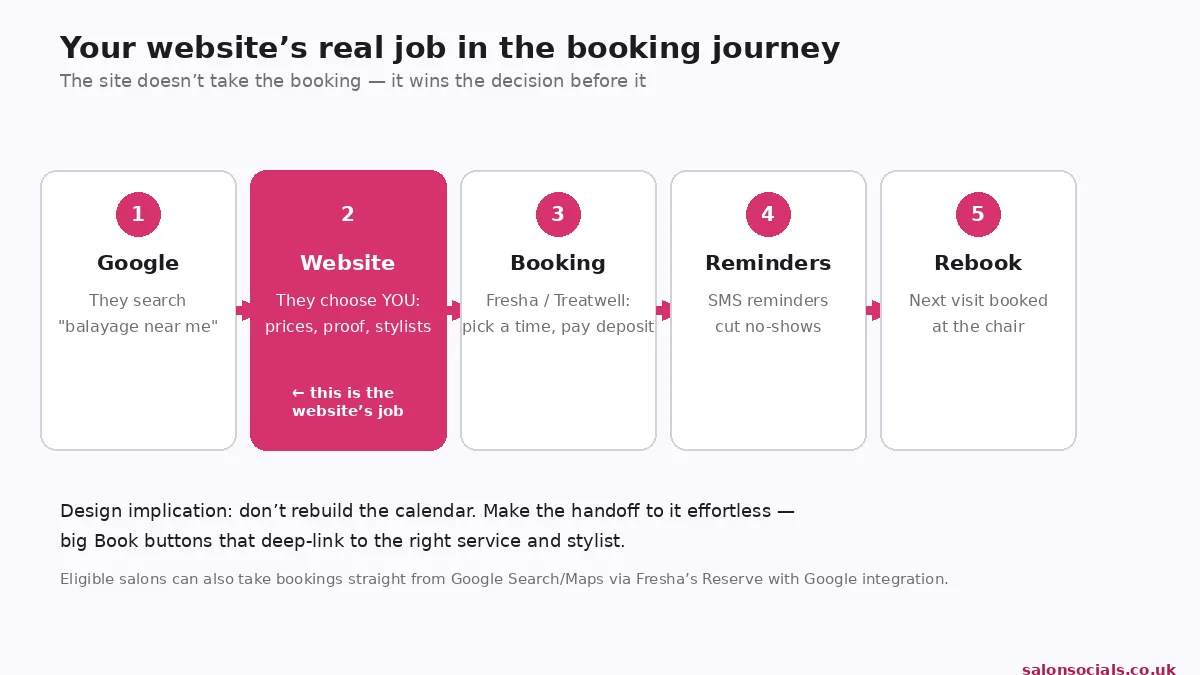
Forget "online presence": your site has one job, win the decision before the booking. A client discovers you on Google, checks your site, then books, web design for hair salons fails when it starts with aesthetics instead of that journey.
Every page must answer four questions fast: do you offer what I need? How much? Can I trust you? How do I book? If a visitor can’t answer all four in five seconds on their phone, the design is decoration.
The homepage: everything a booker needs in 5 seconds
The top of your homepage is the hardest-working part of your site:
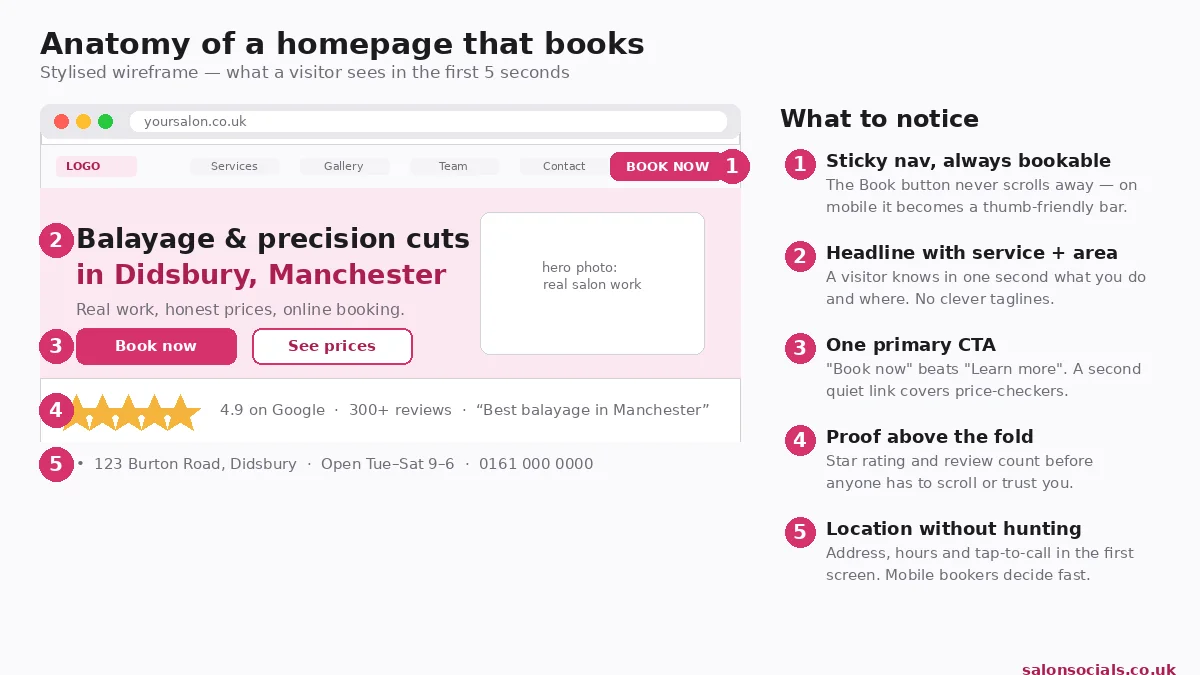
- A sticky nav with a Book button that never scrolls away (on mobile, a thumb-friendly bar).
- A headline naming the service and the area, "Balayage & precision cuts in Didsbury, Manchester", not "Where hair dreams come true".
- One primary call to action, "Book now" beats "Learn more"; a quiet "See prices" link covers price-checkers.
- Proof above the fold, your Google star rating and review count, before anyone has to trust you.
- Location without hunting, address, hours and tap-to-call in the first screen.
Below the fold: services with prices, real work, stylist faces, reviews, a final booking prompt. Every scroll should end somewhere useful.
Colour pages that sell, not just list
Colour is where hair salon sites win or lose, highest value, most searched ("balayage near me"). Give every major colour service its own page.
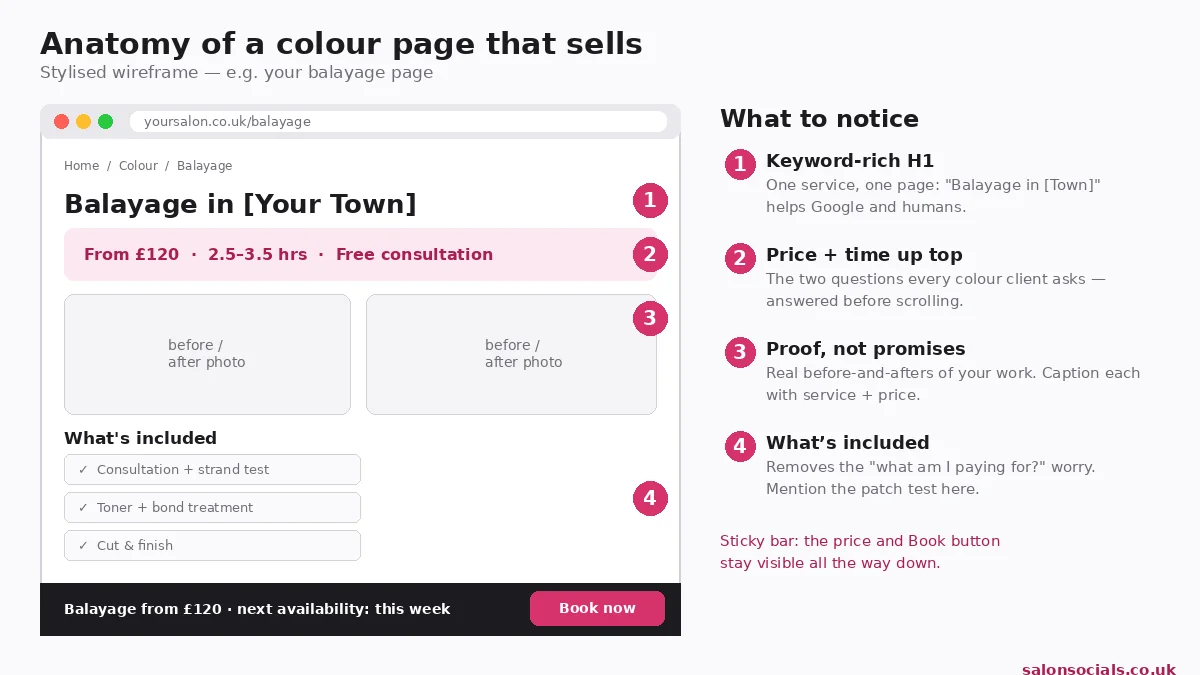
Each colour page needs price and duration at the top ("From £120 · 2.5 to 3.5 hrs"), what’s included (toner, bond treatment, cut and finish), a consultation booking option (a free 15-minute consult converts browsers who’d never book £120 sight unseen), patch-test info (your colourists set the timing), and real before-and-afters captioned with service and price.
Weak colour section: "Balayage, POA. Please call for a consultation."
Better colour section: "Balayage from £120 · 2.5 to 3.5 hrs · includes toner, bond treatment, cut & finish. New to colour? Book a free 15-minute consultation first, we’ll patch-test and quote you exactly."
It answers price, time, what’s included and the next step.
Galleries and stylist pages: proof and people
Two things persuade: the gallery (proof of work) and the stylist pages (proof of people).
Style galleries organised by service, not by date
Most salon galleries are a reverse-chronological dump. Organise by service instead: Balayage, Bobs, Blondes, Brunettes, Curly, Colour correction.
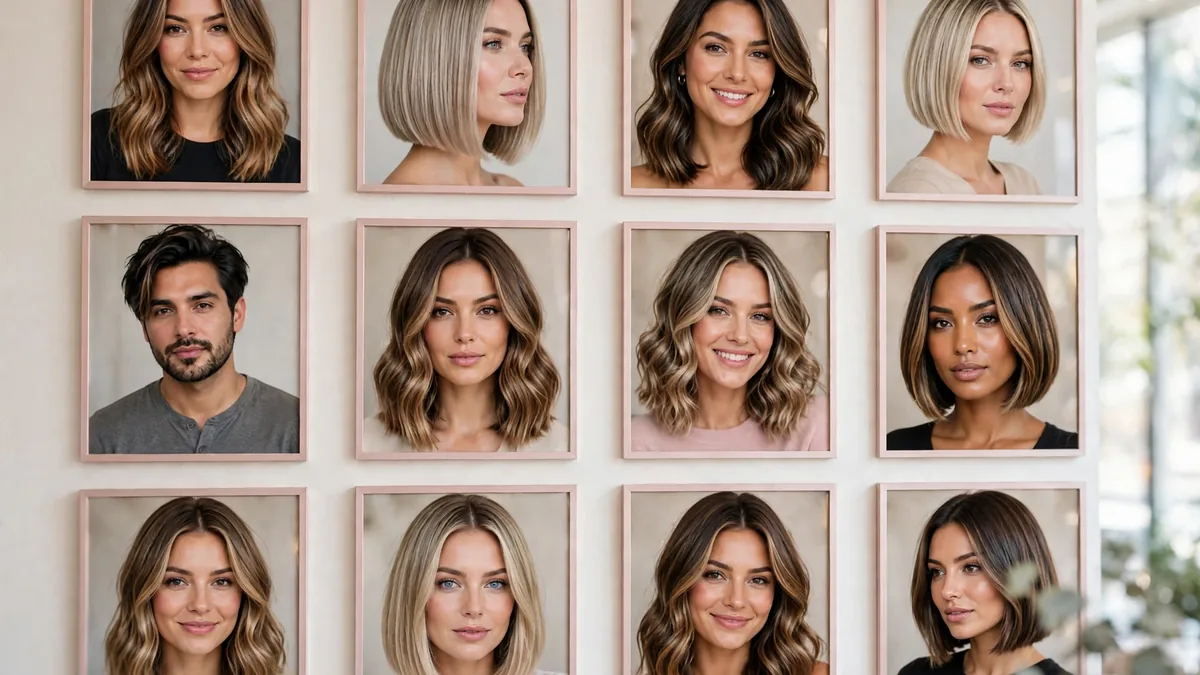
Every photo: real work with permission, captioned with the service, linked to that service’s page, with descriptive alt text, free SEO and accessibility in one. An Instagram feed is a supplement, never the gallery itself: feeds break, leak visitors mid-decision, and give Google nothing to index. If keeping it fresh feels like a second job, our social media management for salons handles it.
Stylist pages: hair clients follow stylists, not salons
The page most salon sites skip, and the one hair clients want. When someone searches a stylist’s name after a recommendation, a proper page captures a booking a generic Team page loses.
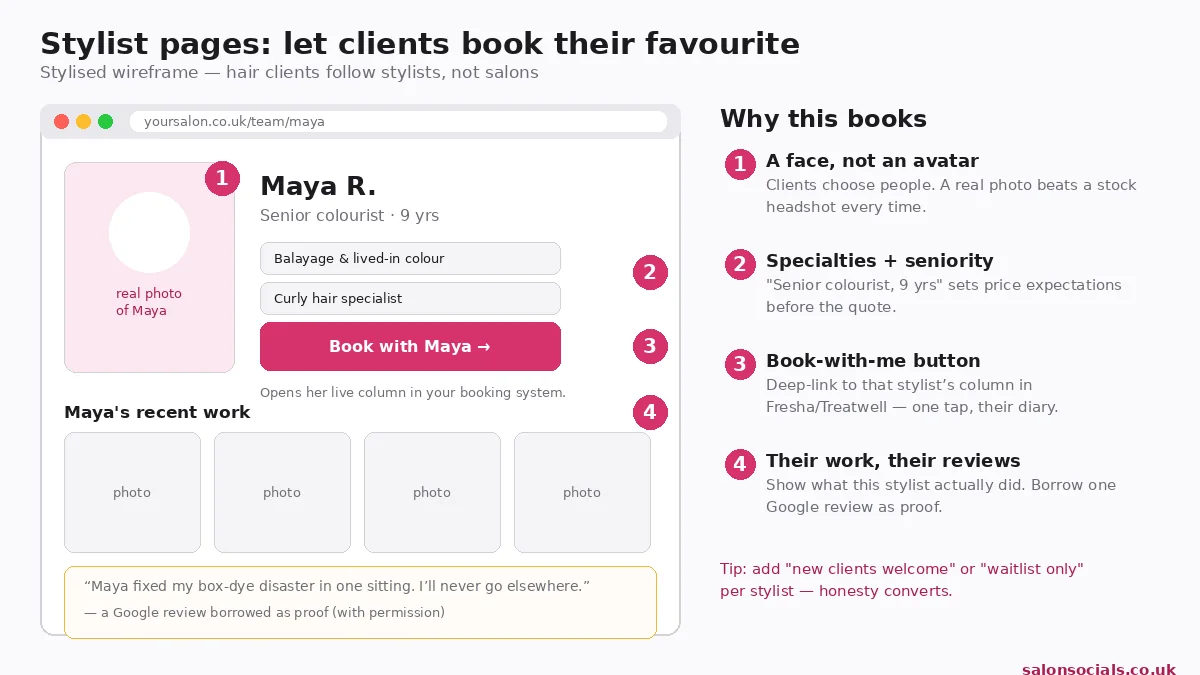
Each page needs a real photo, specialties and seniority ("Senior colourist · 9 yrs" sets price expectations), a Book with [name] button deep-linking to their diary, photos of their own work, and one borrowed Google review. Add honest availability, "new clients welcome" or "waitlist only". If reviews have stalled, our reputation management for salons gets them flowing.
📞 Get a free website review
Wondering what’s wrong with your current site? Book a free 30-minute website review, we’ll walk through your homepage, booking flow and colour pages and name the three fixes that matter most.
Free, 30 minutes, no obligation. We reply within one working day.
From Google to booked: local SEO and the booking flow
Most bookings start on Google and end in your booking system. Your site sits in the middle, it has to be findable first, then bookable.
Get found. A hair salon site Google cannot place is a billboard in the desert:
- Name the town and area on the homepage, in H1s and the footer, not just the Contact page.
- One page per location, each with unique content.
- Identical name, address and phone number everywhere: site, Google Business Profile, directories.
- Link your Google profile to your site, not straight to the booking system.
- Speed matters for rankings and bookings. If it feels slow on your phone, it is, run PageSpeed Insights and fix what it flags.
Full walkthrough: our guide to local SEO for salons.
Then make booking effortless. The rule: service → stylist → time → confirm, no forced account creation. A flow demanding registration before a client picks a service filters out everyone but the most determined.
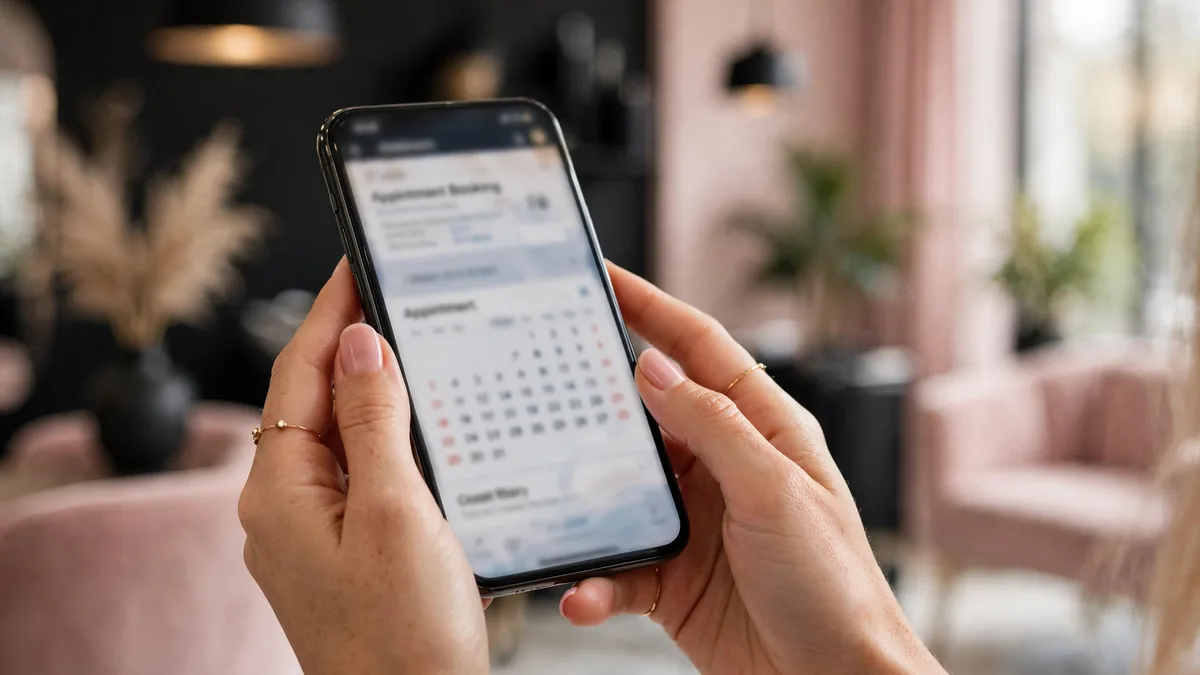
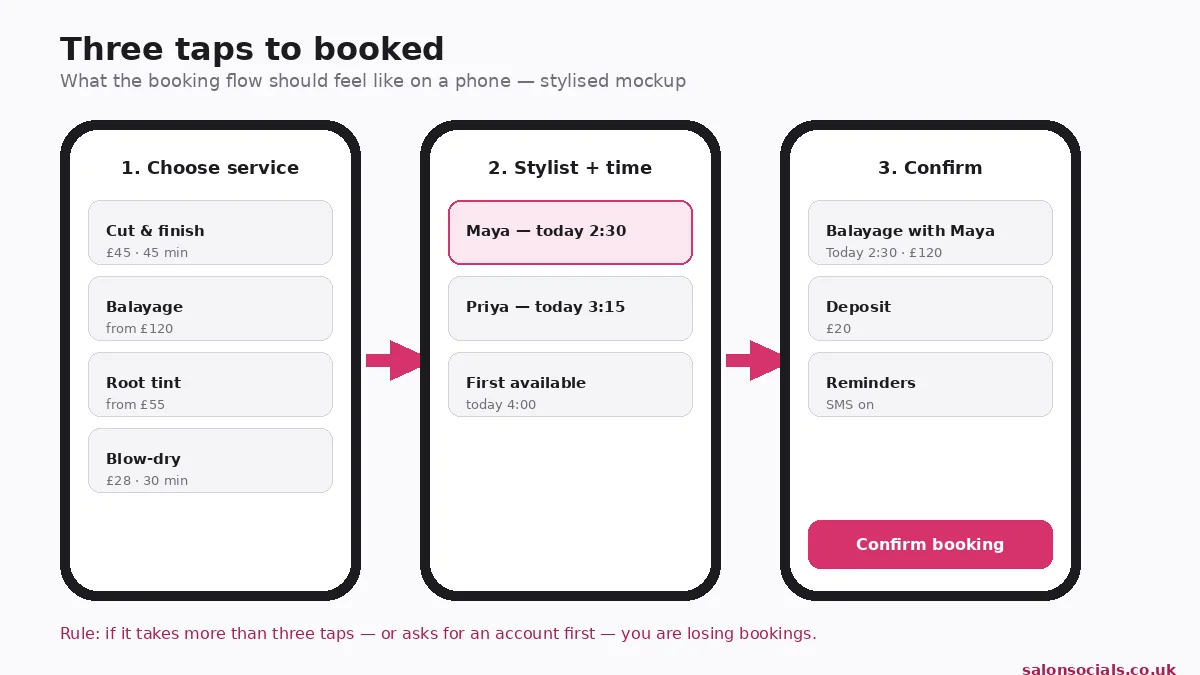
Deep-link everything, "Book balayage with Maya" should open the booking system with both pre-selected. Show deposits and cancellation terms before confirm. Turn on SMS reminders. Keep any embedded widget fast: a calendar that takes ten seconds to appear on 4G costs you the booking and the ranking.
Embed or link out? A lightweight embed keeps visitors on your site; a heavy one should be replaced with big buttons linking out, a fast handoff beats a slow embed. Eligible salons can also take bookings straight from Google Search and Maps via Fresha’s Reserve with Google integration; Google’s own guide shows how clients use it.
Template, freelancer or studio? Choosing a hair salon web design company
You don’t need the most expensive option, the right one. When comparing hair salon web design services, from freelancers to a full hair salon web design company, use this:
| Your situation | Best route | Why |
|---|---|---|
| Just starting, tight budget | A quality template, set up properly | Bookable fast, if the booking flow, prices and photos are right. |
| Growing salon, clear brand | A freelancer or small studio | Custom layout, proper booking integration, someone who understands salons. |
| Multi-stylist or multi-location | A studio with local SEO experience | Location pages, booking integration and ongoing support matter here. |
Every good quote includes: mobile-first build, booking integration, individual service pages, real-photo gallery, stylist pages, Google reviews, speed optimisation, an ICO-compliant cookie banner (guidance; general information, not legal advice), a privacy notice, and training so you can update prices yourself.
Red flags: no booking integration mentioned. Stock photos as "imagery". "SEO included" with no specifics. No handover training. And any on-site offer must be genuine, the ASA requires evidence for price claims and has banned brands for unprovable "was/now" prices.
When it comes to web design, hair salon owners should judge every quote by one test: does this make it easier for a stranger to book?
Rather hand it to specialists? Our web design for salons follows exactly this checklist.
The 1-hour audit: the 5 mistakes it catches
Before you pay anyone, run this on your current site. Phone in hand, ten minutes per step:
- The 5-second test. Show a stranger the homepage for five seconds: what you do, where, roughly what it costs, how to book?
- The booking test. Taps from homepage to confirmed booking: more than three, or an account wall, fails.
- The price test. Every service priced with a duration? Any "POA" fails.
- The photo test. Every photo your salon, team and work? Any stock fails.
- The location test. Does the homepage name your town? Address, hours and phone in every footer?
- The speed test. Feels instant on mobile data? If not, run PageSpeed Insights and send the report to your developer.
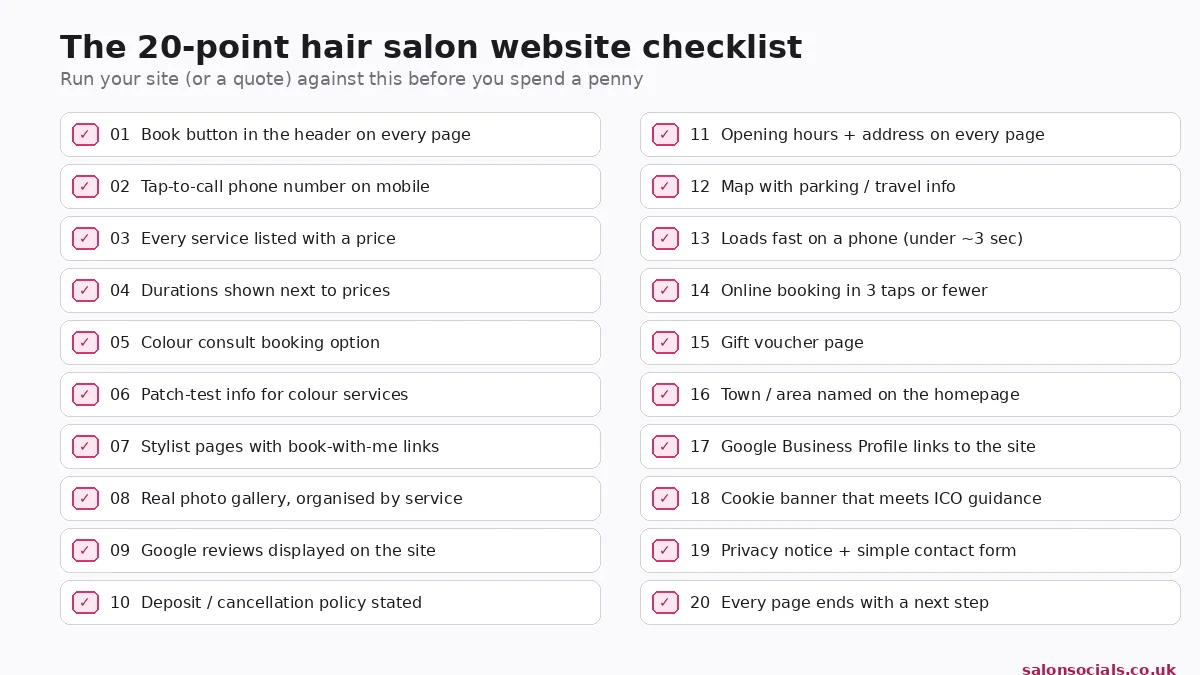
Most salon sites fail at least three. The usual suspects:
- Hidden prices. "POA" doesn’t signal luxury, it tells price-checkers you’re expensive and sends them to the salon listing "Balayage from £120".
- Bookings only via Instagram DMs, missed on busy Saturdays, no deposit, no reminder, no record.
- Stock photography. Clients spot it instantly, wrong chairs, wrong country. Every stock photo is a trust withdrawal.
- A slow booking widget. A calendar crawling on mobile data undoes good design in the final ten seconds, test the full flow on 4G before sign-off.
- No location signals. A beautiful site that never names its town can’t rank for "balayage in [town]" or reassure visitors they can get to you.
Each failure has a fix in this guide, fix the booking flow first.
Frequently asked questions
How much does a hair salon website cost in the UK?
It depends on the route: a well-set-up template costs the least, a freelancer or small studio sits in the middle, and a full studio build with booking integration and local SEO costs the most. Get three quotes and compare them against this guide’s checklist, the cheapest quote that skips booking integration is the most expensive mistake. (56 words)
Do I need online booking on my hair salon website?
Yes, clients book at 11pm, not just in opening hours. Use your booking system (Fresha, Treatwell or similar) embedded or deep-linked with big buttons, and never force account creation before they’ve picked a service. Eligible salons can also take bookings from Google Search and Maps. (45 words)
Should I use a template or a custom design for my hair salon?
Starting out? A quality template with proper setup, real photos and a working booking flow serves you well. Go custom with a distinct brand, multiple stylists or locations, or booking logic (like colour consults) templates handle badly. Either way, booking flow matters more than design. (45 words)
Can I just use Instagram instead of a website?
No, use both. Instagram builds desire; your website captures the booking. Clients who see your work on Instagram then Google your salon name, without a proper site they land on a competitor. Your website is the one platform you own. (40 words)
How often should I update my hair salon website?
Update prices the day they change, add new team within a week, refresh the gallery monthly. Quarterly, check the booking flow works, offers are current, and seasonal pages (Christmas party hair, wedding season) go up in good time, not the week before. (42 words)
The bottom line
Good hair salon web design isn’t about the prettiest site in town, it’s about the easiest to book: honest prices, real photos, stylist pages, a three-tap flow. Get that right and your site stops being a brochure and starts being your best receptionist.
Where does your site stand? Book a free 30-minute website review, we’ll audit it against this checklist and name the three fixes that matter most.
Free, 30 minutes, no obligation. We reply within one working day. Prefer to message first? Use our contact page.
Last updated: October 2026