If you are researching beauty salon web design, you are probably planning a new website or wondering why your current one never brings bookings. Here is the honest answer: your website has exactly one job, turn visitors into booked appointments. Everything else is decoration. This guide shows you the 8 things a salon site needs to do that job, the UK rules it must follow, what it should cost, and a go-live checklist.
TL;DR, what your site needs
- One job: turn visits into bookings. If a visitor can’t book in under a minute on their phone, the design has failed.
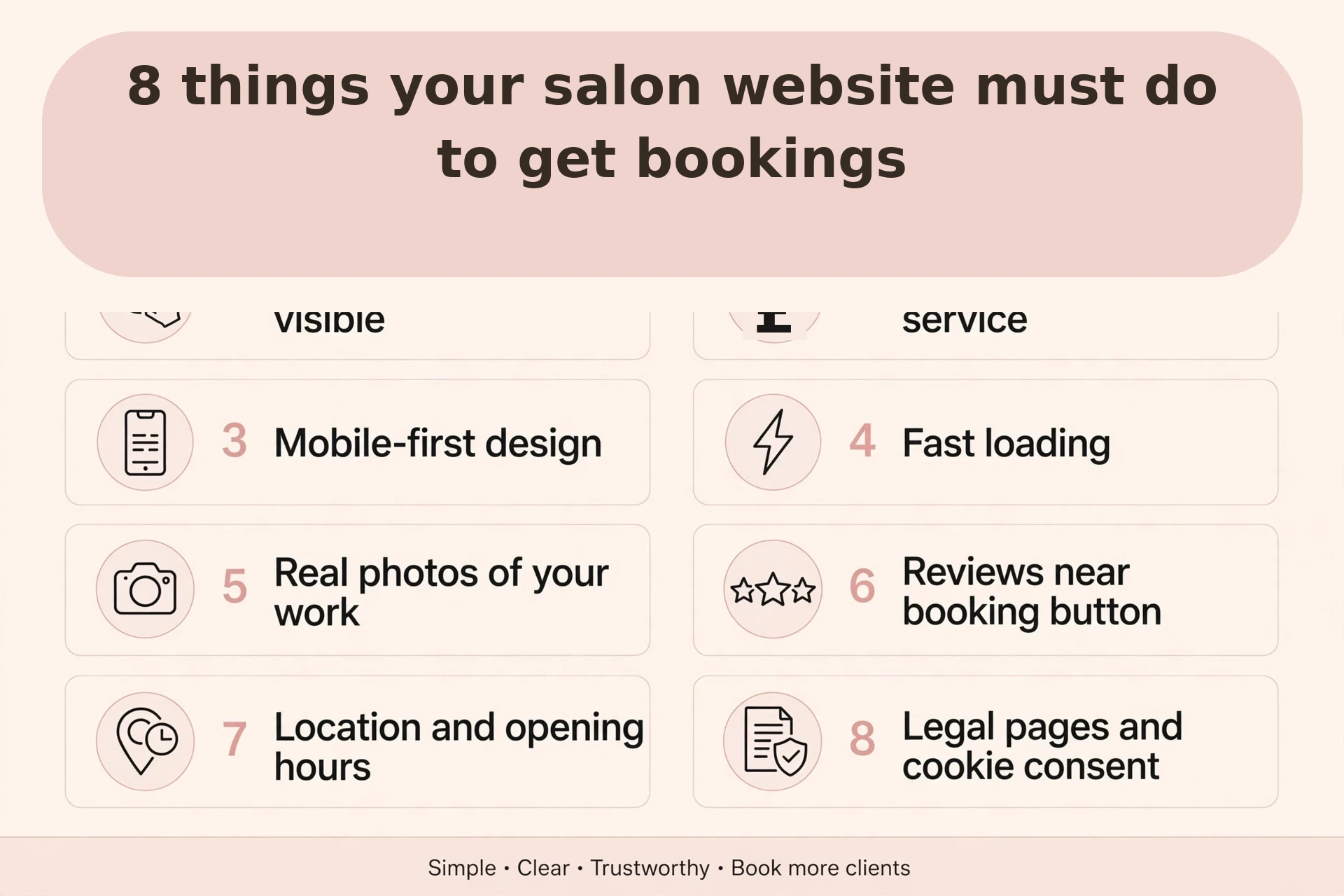
- The 8 must-haves: an always-visible Book button, prices on every service, mobile-first layout, fast loading, real photos, reviews near the booking button, location and hours, legal pages with cookie consent.
- UK rules: genuine prices (ASA), cookie consent before tracking (PECR), written consent for client photos (UK GDPR).
- Costs: DIY from ~£10/month, freelancer £500 to £3,000, agency £3,000 to £8,000+. Already getting bookings? Don’t rebuild, fix the leaks.
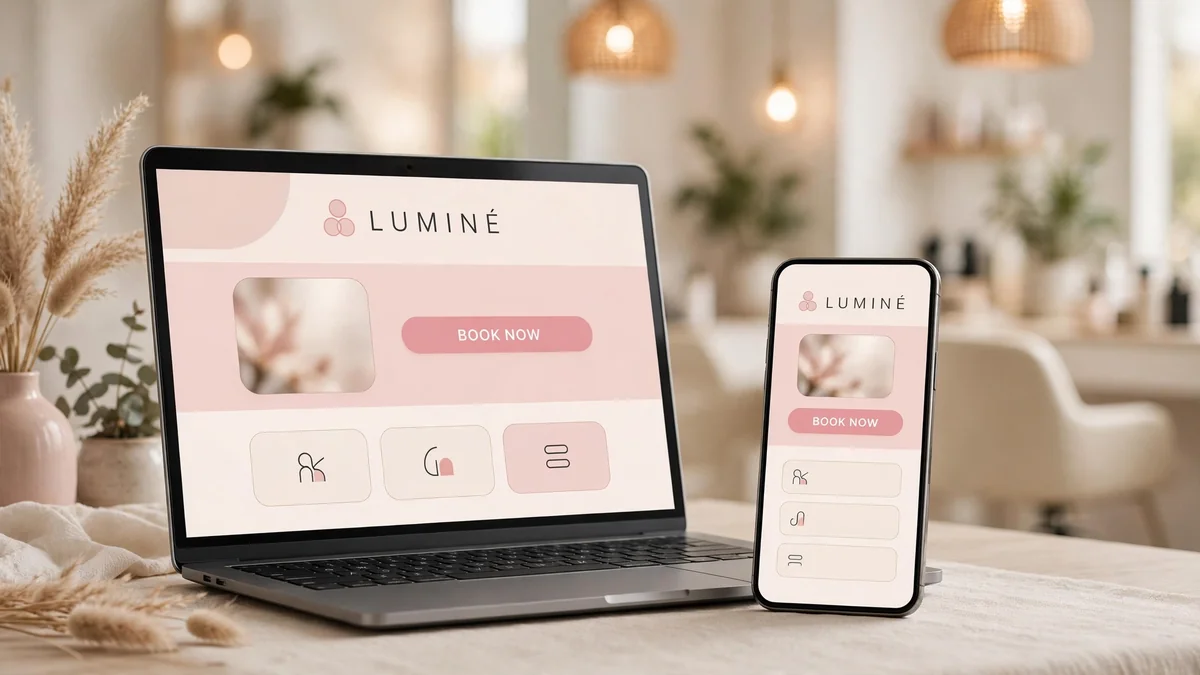
Planning a new site or a redesign? Book a free 30-minute website review, we’ll tell you exactly what’s costing you bookings.
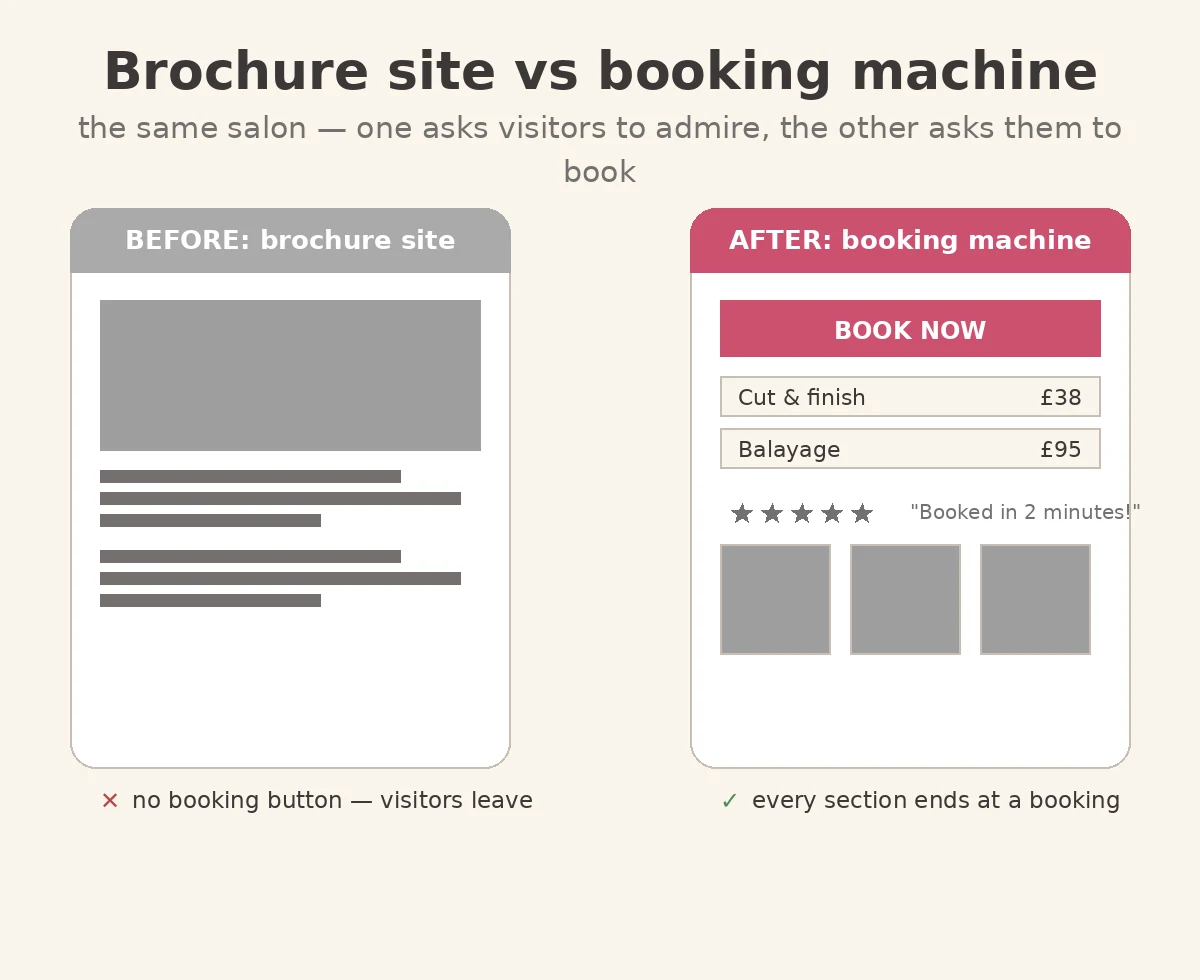
Most salon websites are brochures: pretty, but they make visitors work to book, find the contact page, find the number, call in opening hours, hope someone answers. Every step loses people. A booking machine answers three questions, what do you do, what does it cost, how do I book, then gets out of the way.
Before you brief a designer, run the one-minute test: open your site on your phone and book as a new client. More than a minute, or you have to call? It’s a brochure. This guide fixes that.
Beauty salon web design: the 8 things your homepage needs
The best web design for beauty salons isn’t the prettiest, it’s the one that books. Here is the anatomy, section by section:
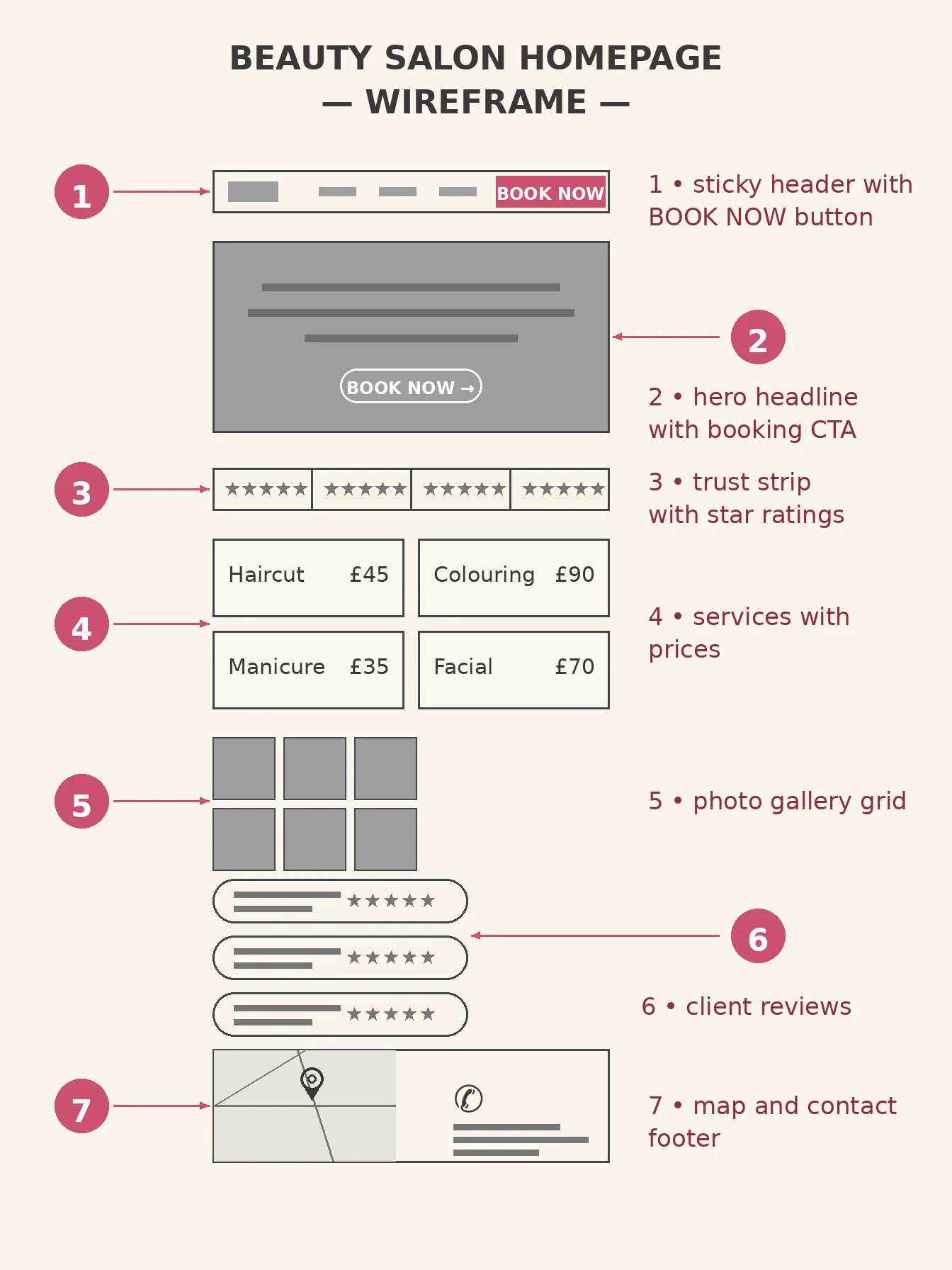
- A sticky header with a Book button. The booking action stays visible while visitors scroll. No hunting.
- A hero with a headline and a booking CTA: say what you do and where (“Balayage & blonding in Didsbury”), then one button. Not three.
- A trust strip with star ratings. Your Google rating in the first screen, it answers “can I trust them?” before it’s asked.
- Services with prices. Not “services” linking to a PDF, the actual treatments with “from £X” right there. This is the section most salon sites get wrong.
- A photo gallery of real work. Your clients, your stylists, your salon. Daylight phone photos beat stock images, clients book the stylist, not a model.
- Client reviews. Two or three short, real Google reviews near booking buttons, not on a separate testimonials page nobody visits. (This is where reputation management pays off, fresh reviews feed the site automatically.)
- A map and contact footer. Address, phone, hours, and a correctly placed map pin, “near me” visitors check this before they book.
If your branding and photography need work before they go on a site, that is a brand design job first, a beautiful site with weak photos still looks weak.
The booking flow is where salons lose clients
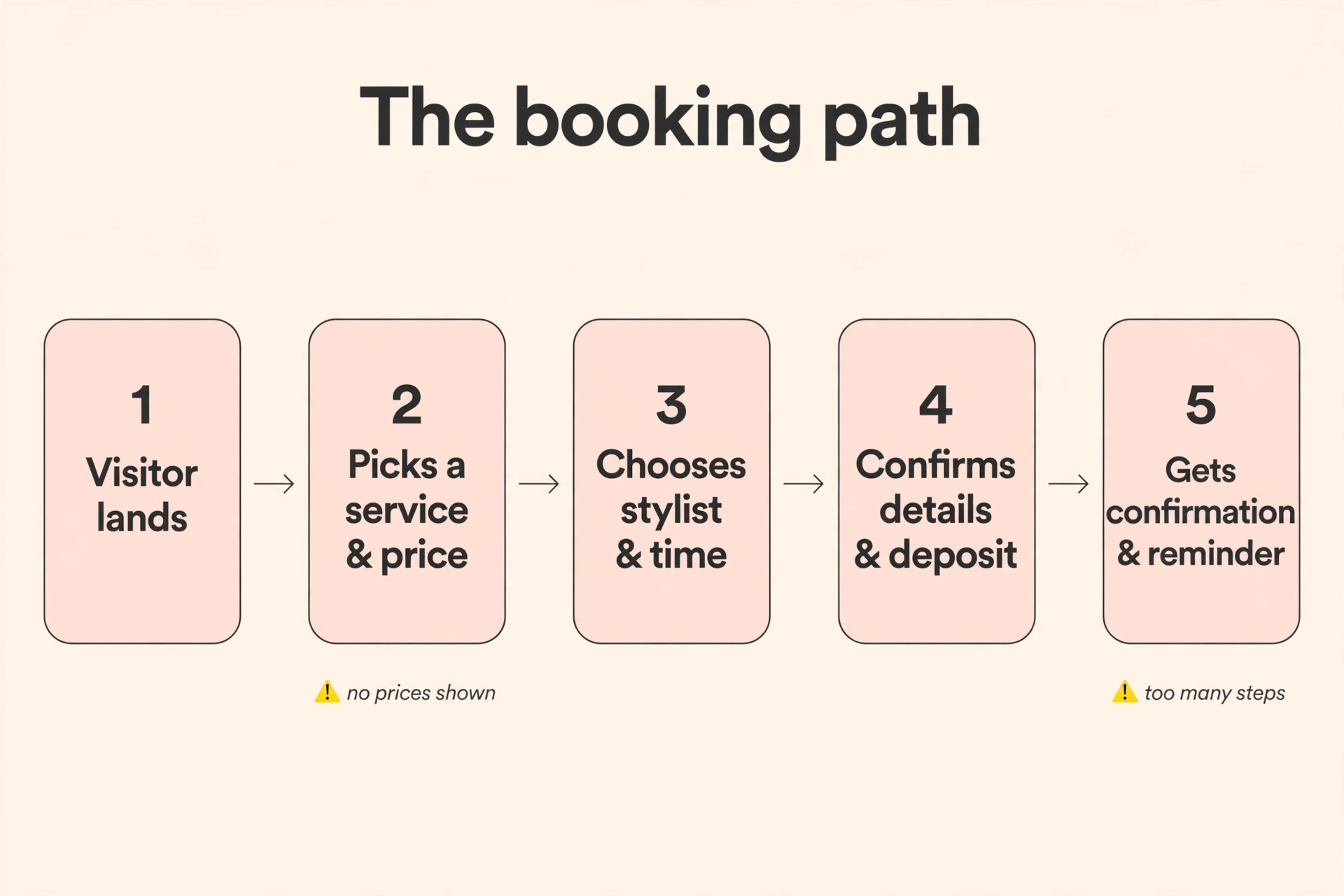
Getting someone to your site is only half the battle. The booking flow, the steps between “I want this” and “I’m booked”, is where most salons quietly lose clients. Here is what a converting flow looks like:
And the widget itself, annotated:
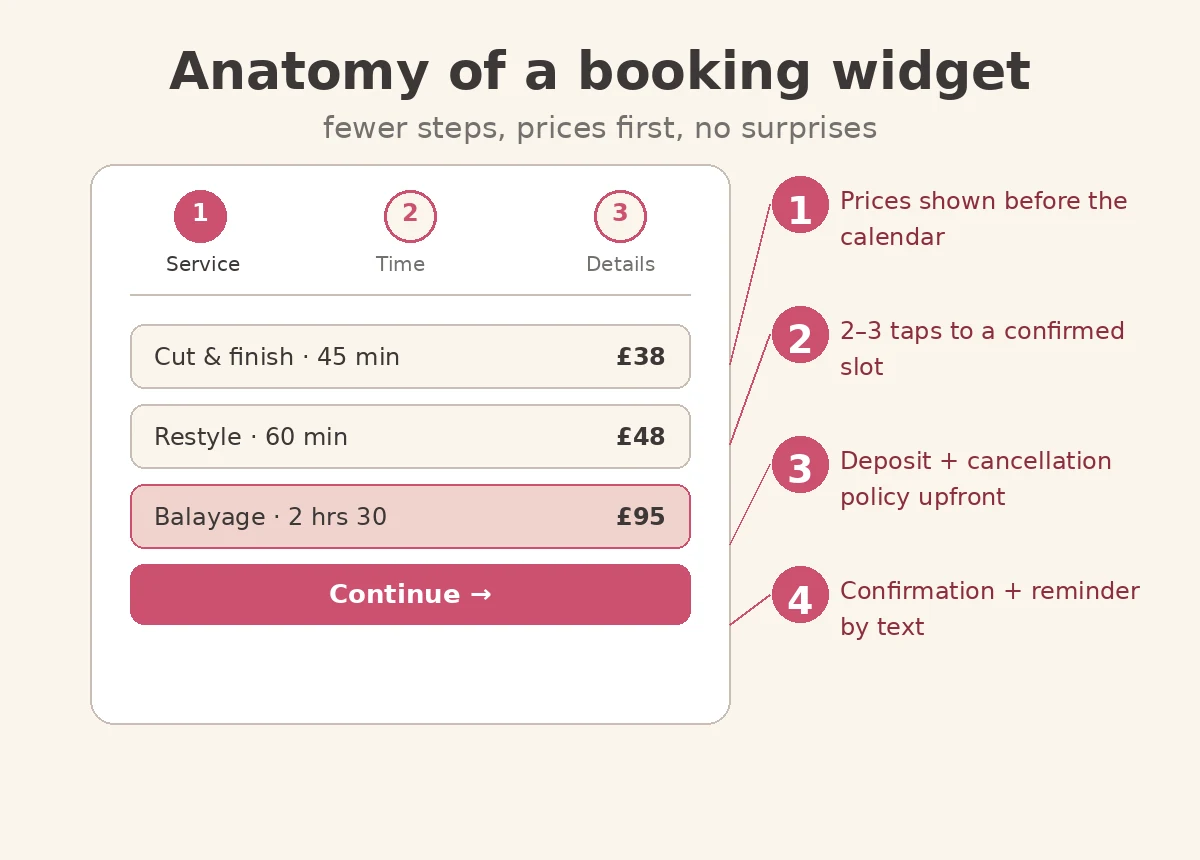
- Prices before the calendar. Never make someone pick a date before they know the cost, surprise pricing is the top abandonment point.
- Two to three taps, not seven. Service → time → details. Every extra screen (account creation, anyone?) costs you bookings.
- Deposit and cancellation policy upfront. Stating it clearly doesn’t put people off, it filters out the ones who’d no-show.
- Confirmation and reminder by text or email. The booking isn’t done when they click confirm; it’s done when they sit in your chair.
A practical note: most UK salons book through Fresha, Treatwell or Booksy. You don’t need to abandon yours, embed its booking widget on your site so visitors book without leaving. A marketplace listing rents you clients; your own site with your own booking flow keeps them.
Free website review
Wondering where your site leaks bookings? Book a free 30-minute website review, we’ll audit your booking flow and name the three fixes that matter most.
Free, 30 minutes, no obligation. We reply within one working day.
Design for the phone first
Most salon searches happen on mobile, someone on the bus searching “gel nails near me”. If your site was designed on a desktop and squeezed onto a phone, it’s backwards.
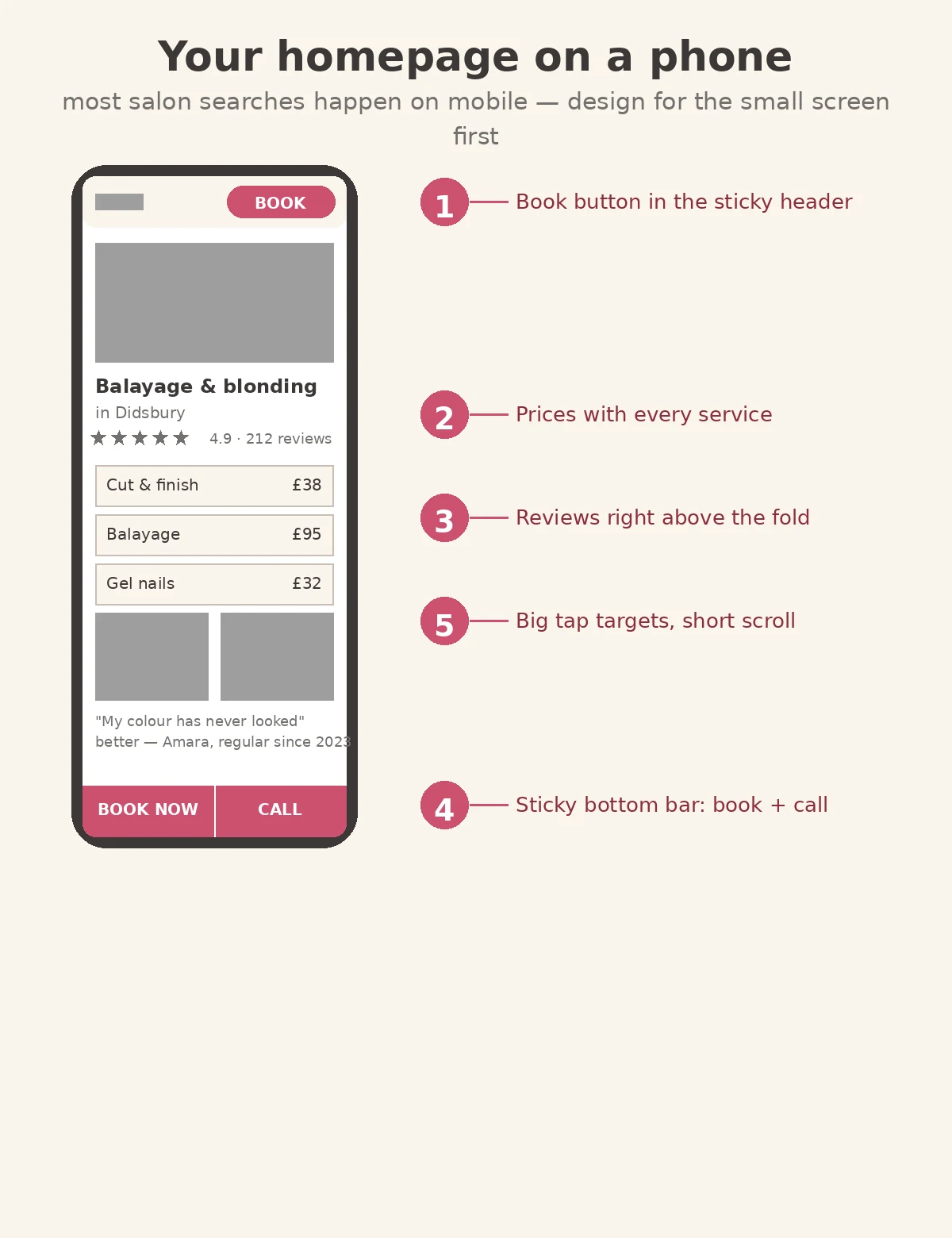
The mobile non-negotiables:
- Sticky Book button in the header, plus a sticky bottom bar with Book and Call in thumb reach.
- Tap-to-call everywhere your number appears. Nobody copies a phone number from a website on mobile.
- Big tap targets, short scroll. If visitors must pinch, zoom or scroll past screens of welcome text to find prices, they’re gone.
- Test on a real phone, on 4G, your designer’s office wifi is not your client’s bus ride.
Give every treatment its own page
Your homepage sells the salon; service pages sell the treatment, and rank on Google for searches like “balayage Didsbury”. Every treatment worth £50+ deserves its own page.
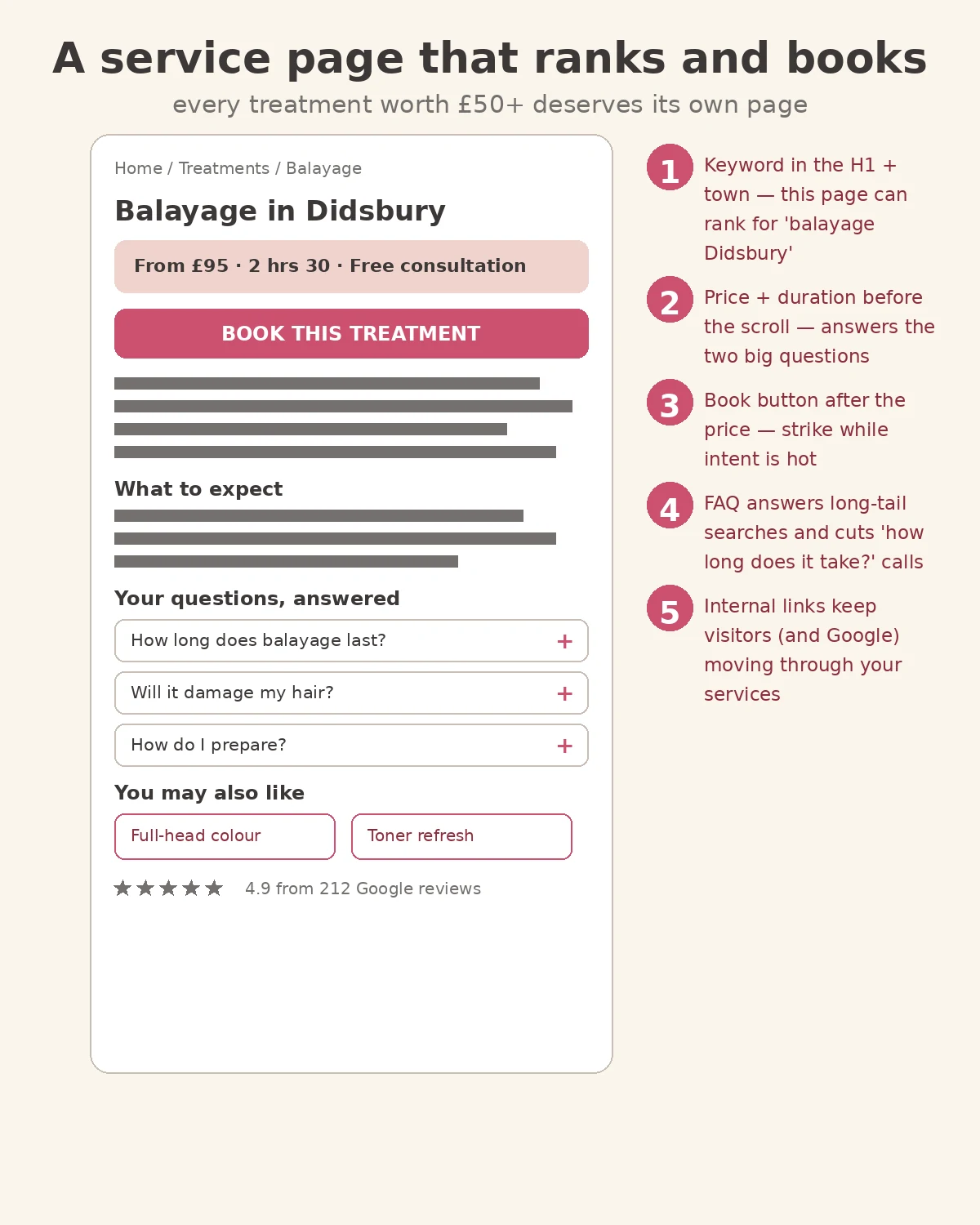
Each service page needs:
- Treatment + town in the H1 (“Balayage in Didsbury”), this is what the page ranks for.
- Price and duration before the scroll, “From £95 · 2 hrs 30” answers the two biggest questions instantly.
- A book button right after the price. Strike while intent is hot.
- A short FAQ answering the questions clients always ask (“How long does balayage last?”, “Will it damage my hair?”). These capture long-tail searches and cut “how long does it take?” phone calls.
- Internal links to related treatments (“Full-head colour”, “Toner refresh”), they keep visitors and Google moving through your services.
This is where local SEO for salons compounds: each service page is another chance to appear when someone nearby searches what you do. For the full walkthrough, see our guide to local SEO for salons on Google Maps.
The UK rules your site must follow
A beautiful site that breaks UK rules is a liability. Three areas matter, this is general information, not legal advice:
Prices must be genuine (ASA). Under UK advertising rules, price claims must not mislead, “was/now” prices must reflect a genuine established usual selling price, and the ASA has banned brands for savings claims they couldn’t substantiate. Check the ASA’s guidance on misleading advertising before you advertise “WAS £80 NOW £60”.
Cookie consent (PECR). If your site sets non-essential cookies, analytics, Meta pixels, embedded booking widgets often do, you need the visitor’s consent before they fire, with reject as easy as accept. The ICO’s guide to PECR explains what’s required.
Client photo consent (UK GDPR). Before-and-after photos need written consent from the client to be published, a verbal “yeah, fine” isn’t enough if there’s ever a dispute. Put a simple photo-release line in your consultation form.
Accessibility basics. Use readable text, descriptive image alt text, and keyboard-friendly navigation. It’s good practice, good SEO, and keeps you on the right side of UK equality law.
What it costs, and whether to redesign, rebuild or DIY
UK website costs in 2026 break down like this:
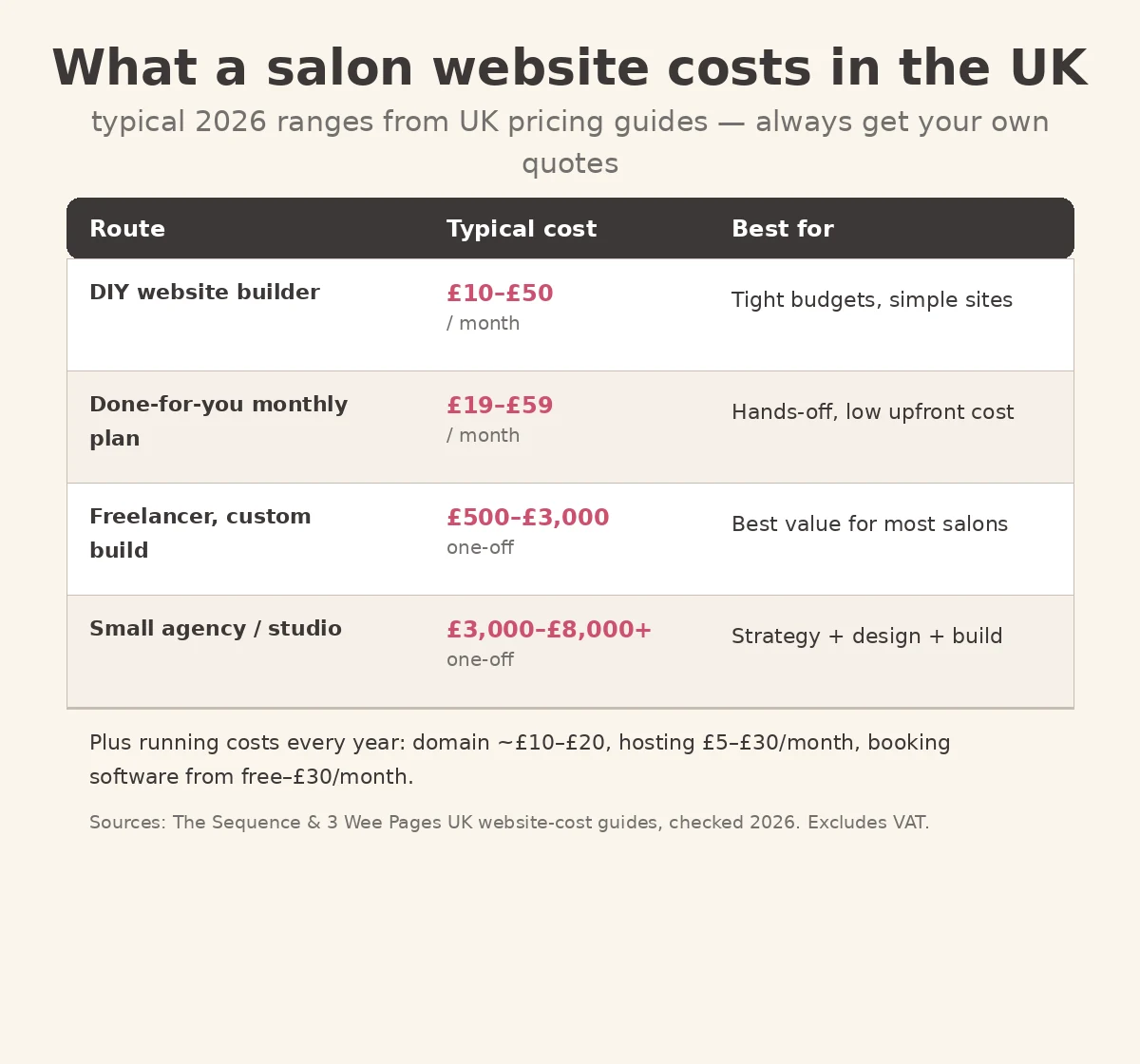
A few honest notes on the numbers:
- DIY builders (£10 to £50/month) are fine for a simple site, but you never own it, stop paying, lose the site.
- A freelancer (£500 to £3,000 one-off) is the sweet spot for most salons, but check their past work for real booking flows, not just pretty screenshots.
- An agency (£3,000 to £8,000+) makes sense when you want strategy, copywriting and design handled together.
- Budget yearly running costs too: domain (~£10 to £20), hosting (£5 to £30/month), booking software (free, £30/month).
Now the decision most owners get wrong:
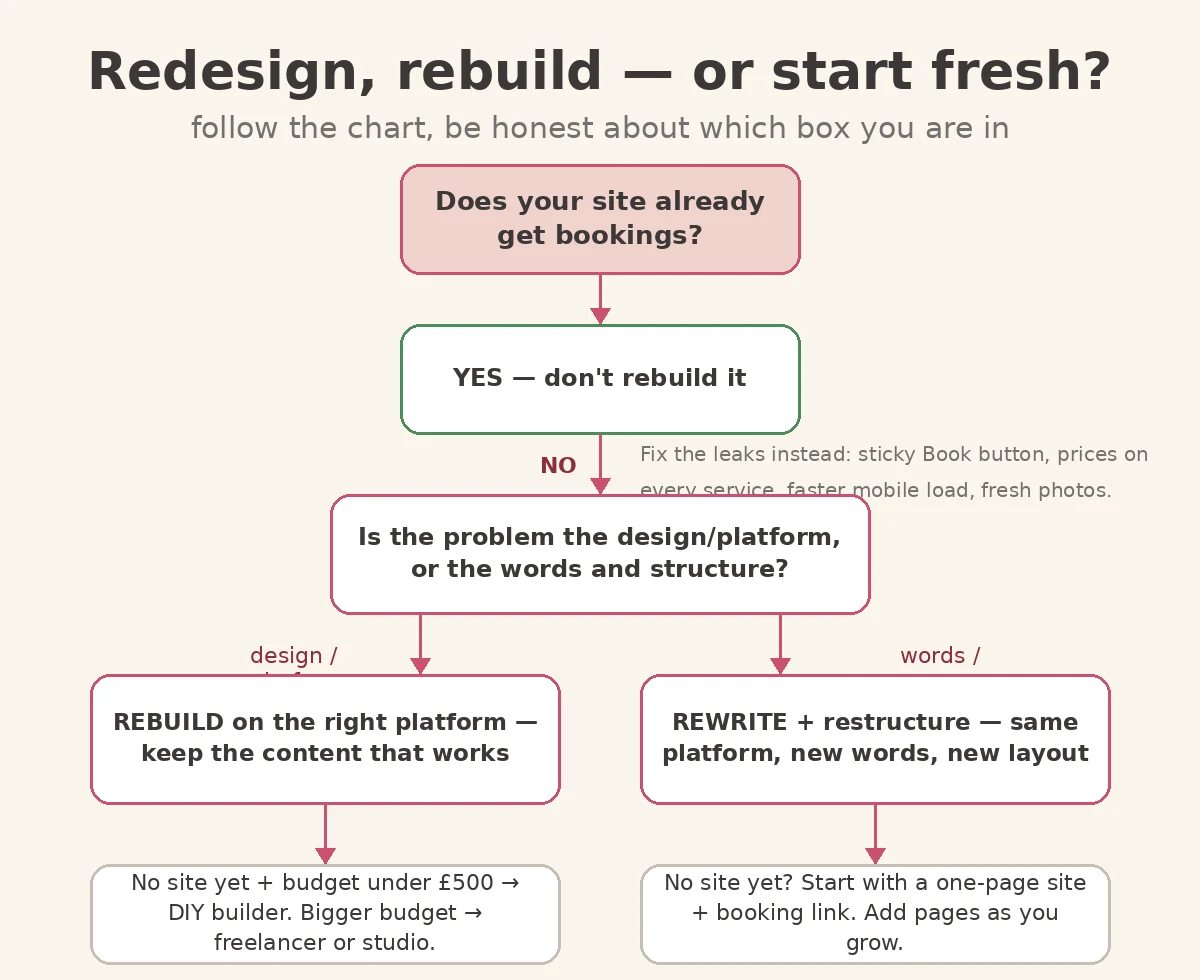
Done-for-you beauty salon web design services should always start with the booking flow, not the colour palette, any designer who shows mockups before asking how clients book is designing a brochure.
The go-live checklist
Before you tell anyone the site is live, and before you pay the final invoice:
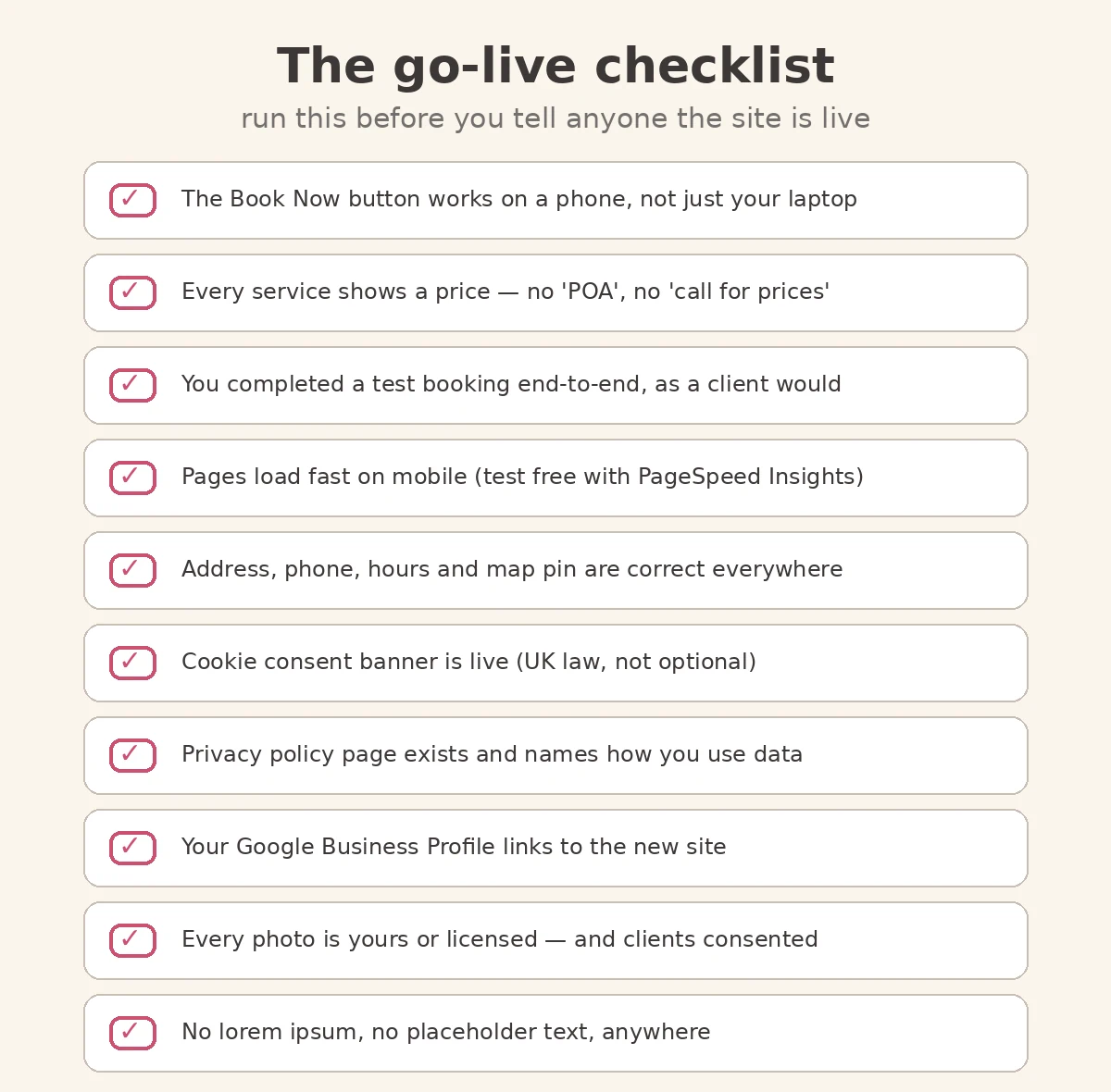
And five mistakes to check for while you’re at it:
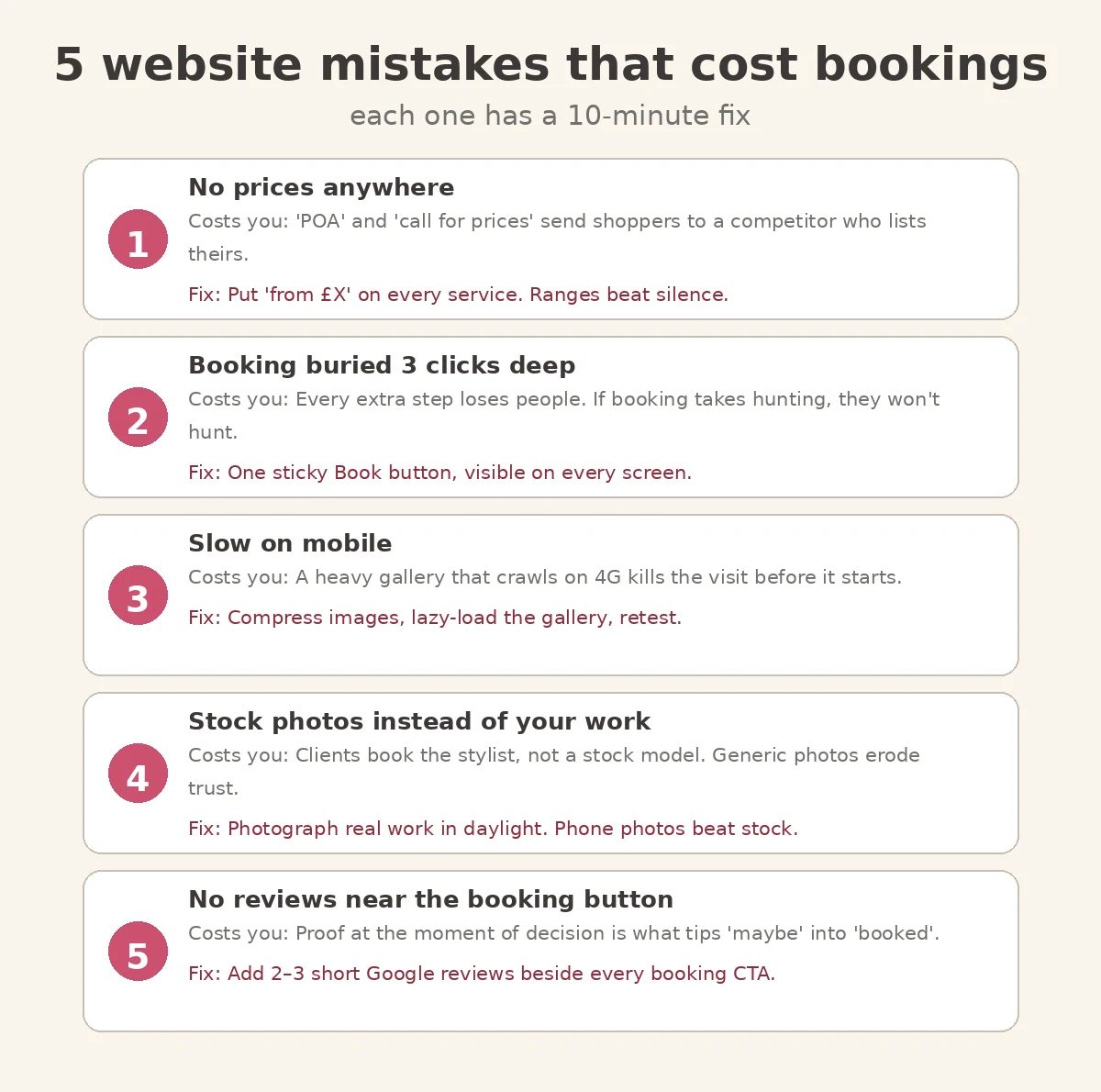
- No prices anywhere. “POA” and “call for prices” send shoppers to a competitor who lists theirs. Put “from £X” on every service.
- Booking buried three clicks deep. One sticky Book button, visible on every screen.
- Slow on mobile. Compress images, lazy-load the gallery, retest with PageSpeed Insights.
- Stock photos instead of your work. Photograph real work in daylight, phone photos beat stock.
- No reviews near the booking button. Add two or three short Google reviews beside every booking CTA.
Frequently asked questions
How much does a beauty salon website cost in the UK?
A DIY builder costs £10 to £50 a month; a freelancer typically charges £500 to £3,000 one-off for a custom site; a small agency or studio charges £3,000 to £8,000+. Add yearly running costs: domain (~£10 to £20), hosting (£5 to £30/month) and booking software. Always compare what’s included after launch, not just the build price.
Do I need a website if I’m already on Fresha or Treatwell?
A marketplace listing rents you clients, it can change its fees, ranking or rules any time. Your own website is the one place you control: your prices, your booking flow, your Google rankings. Most salons do best with both: the marketplace for discovery, your site for direct bookings.
Should I build my salon website myself or hire a designer?
Build it yourself if your budget is under £500 and you’re comfortable with tech, a DIY builder plus an embedded booking widget covers the basics. Hire a freelancer or studio if you want strategy, copywriting and a proper booking flow handled for you. Don’t DIY if you’ll never finish it.
What should be on a beauty salon homepage?
A sticky Book button, a headline saying what you do and where, your star rating, services with prices, real photos of your work, short client reviews, and your address, hours and map. That’s it, everything on the page should move visitors toward booking.
How do I get my salon website to show on Google?
Give every treatment its own page with the treatment + town in the headline, keep your Google Business Profile complete and linked to the site, collect reviews steadily, and make sure the site loads fast on mobile. Our guide to local SEO for salons walks through the full process.
The bottom line
The best beauty salon web design isn’t the most beautiful, it’s the one that turns a 30-second visit into a booked appointment. Sticky Book button. Prices on every service. A flow a client can finish on the bus. Real photos, real reviews, and the UK legal basics covered. Get those right and your website takes bookings at midnight while you’re asleep.
Want a professional eye on it before you brief a designer, or pay the final invoice? Book a free 30-minute website review.
Book My Free Strategy Call Free, 30 minutes, no obligation. We reply within one working day.
Last updated: October 2026